The Parrish Tarot Card APP developing process from strategy set up, user interview based on formative evaluation method, created the user flow chart, did the UI mockup, and did the usability testing by summative evaluation method. In the end, we redesign the APP elements based on the usability testing feedback. Finally, we published the APP and book in 2011.
Challenge
Image 01: Stakeholders relationship diagram
The Parrish Tarot is a book that assists tarot fans to read the card meaning when they play the Tarot card game. The source comes from the first version of the book “The Art Tarot of Parrish” published in 2005. This Tarot game features the aesthetics and the mystery of Maxfield Parrish’s artwork with a translation of the Tarots. I tried to transform the tarot game into a mobile app. Our challenge is how to accomplish the stakeholder’s requests. There are three stakeholders in this project; The book publisher wants to sell the new version in the book store and get the profits. The app developer teams want to sell the Tarot App on the Apple app store and earn the download quantity and profits. At the same time, the readers want to have advanced tarot game experiences.
How to Play Tarot Card?
Tarot cards are there to give guidance, and “spiritual medicine” around what is happening in your personal orbit: love, money, career, goals, and general life path. In the beginning, the development team started to know how to play the traditional tarot card with the guidebook “The Art Taro of Parrish”. The steps are like the left nine guidelines.
Image 02: The tarot card game process
I capture some behaviors which enhance the spiritual connection for example: opening the tarot box, “knock” or tapping the pile of cards, and shuffling. We would like to add those features by dynamic animation effects display mystique.
At the same time, I did a formative evaluation; I interviewed the five taro fans to talk about the potential needs/behaviors when they play the Tarot. I discovered two phenomena: 1. new players would make the notes for their tarots feedback and 2. Most senior tarot players had their own tarot card cover/box which doesn’t allow others to touch it. They believe the personal fairy lives with the cards.
The Target Audiences
The book publisher gave us the reference information about the target audiences of the first version “The Art Tarot of Parrish” which 80 percent are female and aged from 20 to 35 years old. Therefore we set the baseline of the target users. d
Prototype
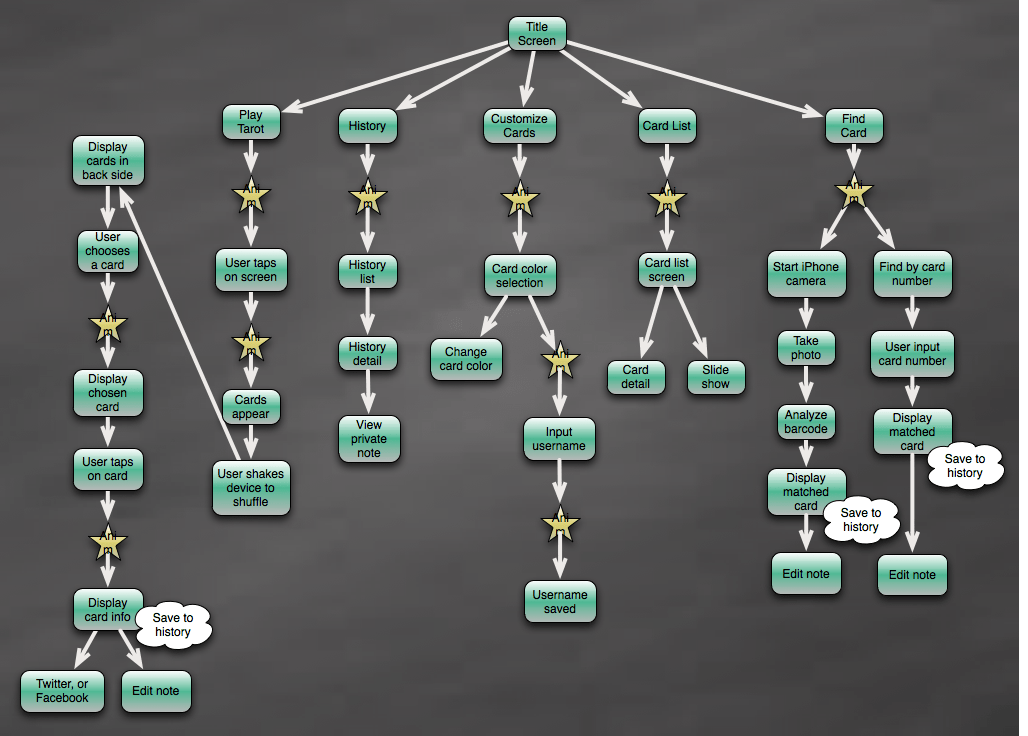
I started setting up the design elements of the Parrish tarot APP from the app functions and visual effects. You can look at the APP flowchart in the image below.
User Flowchart
The functions of the Parrish Tarot are Play Tarot, History, Find card, Card list, and Customize cards.
Image 03: full version APP function with user flow
Play Tarot: User thinks of a question to ask the Parrish tarot and chooses one card. The Parrish tarot will give a result. Users can share the card to Facebook, Twitter, and email to others.
History: APP will recode which card users choose last time as a reference.
Find card: User can enter the card number or scan the QR code on the physical Parrish Tarot cards to read the result. This function has to combine with physical Parrish tarot cards.
Card list: user could view all the beautiful art of Parrish. APP provides a slide show function that lets users view Parrish’s illustration works.
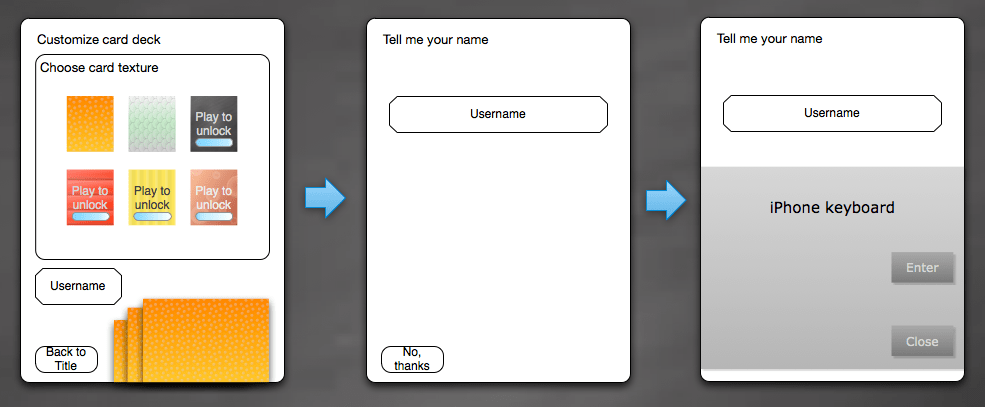
Customize cards: user can change the back of cards and set the user’s name on the card note.
User Interface Wireframe Mock up
I start to do the first draft of the user interface based above functions and operation flow. The user interface focuses on the 768×1024 resolution of the iPad 2 model.
Play Tarot
There are three major steps when users start playing tarot cards. 1. The right below shows cards fly animations to represent shuffles of physical tarot cards when the user asks the question to tarot. 2. The users would see the Parrish art graphic at first and tap the screen when reading the detailed explanation. At the same time, the user can make a note for this round. 3. The user could write the message and share the card graphic on Facebook and Twitter.
Image 04: shuffles cards(left), read card(mid), make a note(right)
History
The users can review the history of which cards they got before and check the note they wrote down. The system would record the date, card name, and private note. The reason why we set up the history function on APP. Due to the user interview with the entry-level tarot users. They like to make a note of most of the questions they asked and the helpful meaning for them at that moment.
Image 05: review the playing list
Find card
Image 06: searching cards via the QR code or card number
There are two ways to find the card when you want to consult the guidebook and your intuition; 1. the users can type the card number. 2. the user can open the camera to scan QR code on the card. The new version of “The Art of Parrish ” book has a new design on the tarot cards. The publisher adds the card number and QR code to the cards. We want to create digital and physical items that can mix used possibilities. This solution could achieve the book publisher and APP development team’s profit needs by mixing the use of card reading.
Card list
The card list function provided the users can auto display the graphic of the card cover. It’s like a digital painting collection. There are 88 cards with beautiful illustration paintings on this tarot card set. It is based on the artwork of Maxfield Parrish who was an American painter and illustrator active in the first half of the 20th century.
Image 07: auto play artworks likes digital frame
Customize cards
Image 08: unlock the card cover graphic and set the name on it
The users could set the name on the card cover. And when the user uses the digital tarot card more it means they have more experiences and connections with their personal card. There are more different styles of card cover design that will unlock and collect them when you become an advanced tarot user. We provide this function due to discovery from user interviews that the senior tarot player enjoys having their personal card cover box.
Usability Testing
Image 09: the physical card added a QR code and card number on it
The goal of usability testing was to collect user data about learnability, satisfaction, utility, and app design based on executive assessment. The data could support the development team to adjust app function and user interface.
There are two evaluation methods based on different APP development stages; 1. The formative evaluation considers figuring out which design features are useful and which are not in the early stage. 2. Summative evaluation which provides an indirect assessment of the usability of the design when the product is ready to launch. We already did the formative evaluation in the early stage. Now I use a summative evaluation method to know the user feedback.
I invited 20 users to be the testing subjects, aged 20~35 years old. There are 16 females and 4 males. The testing subjects play tarot from entry-level to advanced level each in 50%
Image 10: the user testing agenda
The testing agenda is on the left sheet (see image 10), the process took around 20~30 mins for every testing subject. I do the A/B testing. The A testing was the users take a physical tarot card in the traditional way to do it three times in the first round. The B testing would be the second round which users play three times by the physical tarot with the APP on the iPad. The user started the questionnaire after they completed A/B testing.
I evaluated four indexes of learnability, satisfaction, app design, and utility by the five-point Likert scale in the questionnaire. For the efficiency index, the tester evaluated by using the timer to record the testing subjects’ operation time. After the user testing, we received 20 valid questionnaires.
Image 11: the summative evaluation result
Image 12: the user testing event
The result shows the average score higher than 3 points on playing tarot cards with a digital App. That means users are satisfied with this app design and the learnability score is 4.04 points which shows the users easy to learn the APP operation flow. The utility index had a 0.7332 standard deviation which is higher than o.5 scores. The main difference comes from the entry-level users who feel the digital app helps a lot. They don’t need to look for a physical guidebook when they read the card interpretation. But senior tarot users already had card reading skills. So they don’t feel the APP gives useful support.
Conclusion
Sum up the design elements were evaluated and the data was collected, the evaluation of that data will reveal what was going wrong and where the users are struggling the most. I got three user insights:
As a beginner it is not easy to translate the meaning of a card from the graphic. Even the guidebook and digital app provide all the scripts. They still want to make a note from the senior players’ explanation. So I might improve the note function. Let entry level users write/draw down details on the play card and history functions.
Most users love the dynamic animation display which enhances magic connection with tarot users. So the suggestion was add the tarot symbols such as smoke/star effects when users open the card box, cards fly around on the screen like a real shuffle after the card opening and tapping a card will show the glory five star ring sign.
I provide the full functions for the user testing. From the questionnaire feedback shows the find card function can complete the tarot reading task for the basic request. The play card function provides the possibility to use the app on a mobile device without the physical card/book. That is very convenient for the users. We might publish different versions of APP on the apple store by particular function group. In this way that could achieve the every stakeholders profit request. The publisher needs audiences to buy the books and free download which have a find card function. The APP development team needs users to buy APP from the Apple store which can use full functions. The tarot users still keep their playful experiences however which way they choose.